

























Spin the Wheel: Free Wheel of Fortune With Your Own Options
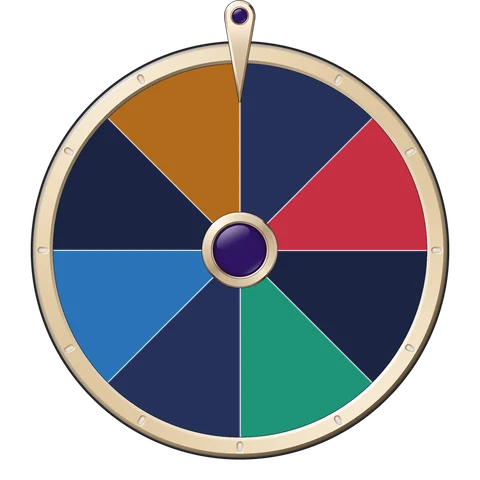
This free wheel of fortune picks one of your own options at random: type names, choices or numbers, one per line, and spin the wheel. Every option gets an equal slice and comes up equally often. There is a Yes / No list and a number picker built in, a full-screen mode for a classroom or a party, and a link that shares your wheel. No sign-up, and nothing you type is sent anywhere.
Wheel of fortune


8 options
Quick lists
The link carries your options, so whoever opens it gets the same wheel. Your list also stays in this browser for next time.
Spin history
Results show up here, newest first.
How to spin the wheel
- Type your options in the box, one per line: names, choices, tasks or numbers. Or pick a quick list: names, Yes / No, or numbers from 1 to any number you choose.
- Press Spin the wheel, or tap the middle of the wheel. It turns for a few seconds, ticking past each slice, and stops on one option.
- Read the result under the wheel. Every spin also goes into the history list, newest first.
- Taking turns or picking teams? Switch on Remove the winner, and each option leaves the wheel once it has come up.
- Copy the wheel link or send it in Telegram, and whoever opens it gets the same wheel with your options. For a classroom board or a TV, press Full screen.
How does the wheel pick an option?
The pick is made before the wheel moves. When you press Spin, your browser draws one slice with its built-in cryptographic random generator (crypto.getRandomValues), and draws again in the rare case a value would favour one slice over another, so every option is exactly as likely as the next. The wheel then turns several full times and stops at a random point inside that slice, never on a line, so there is no arguing about which side the pointer is on. Nothing about the spin depends on how hard or how often you press.
If a name is on the list twice, it has two slices and comes up twice as often. That is a simple way to give one option more weight.
Yes or no wheel and random number picker
For a quick decision, press Yes / No: the wheel gets two slices, and a spin answers the question. To pick a random number, type the top number next to Numbers and press Fill: the wheel lists every number from 1 up to it, up to 100. With Remove the winner on, the numbers come up one by one without repeats, like a draw from a hat.
Ideas for a class, a team or friends
- Pick who answers next in class, with the class list and Remove the winner switched on.
- Split people into teams, or set the order of turns in a game.
- Choose a film, a restaurant, a board game or a forfeit when nobody can decide.
- Draw a name for a gift swap, a duty rota or a giveaway among friends.
Need a fair dice instead? The dice roller rolls real-looking dice in the browser.
Sources
Frequently asked questions
How do I spin the wheel online?
Type your options in the box, one per line, and press Spin the wheel or tap the middle of the wheel. It turns for a few seconds and stops on one option, which shows under the wheel.
Is the wheel really random?
Yes. The pick comes from your browser's cryptographic random generator before the wheel moves, and every slice is exactly as likely as the others. The wheel always stops inside a slice, never on a line.
How many options can the wheel hold?
From 2 up to 100. Lines past that are left off, and empty lines are skipped.
Can I remove an option after it comes up?
Switch on Remove the winner. The option that came up leaves the list after each spin, so nobody is picked twice: handy for turns, teams or calling on a class.
How do I make a yes or no wheel?
Press Yes / No under Quick lists. The wheel gets two slices, and each spin answers your question.
How do I share my wheel?
Press Copy wheel link or Send in Telegram. The link carries your options, so whoever opens it sees the same wheel and can spin it themselves. Anyone with the link can read the options.
Does the page save my options?
Your list and the Remove the winner switch stay in this browser's local storage, so the wheel is there next time. Nothing is sent to us.
Can I show the wheel on a projector or a TV?
Yes. Press Full screen and the wheel fills the screen with the Spin button under it. Press Escape or Exit full screen to come back.
More free tools
- Secret Santa generatorDraw names and send each person a private link. No email, no sign-up.
- Online advent calendar makerWrite a message for each December day and send the calendar as one link.
- White Elephant game helperThe rules, plus a host screen that draws the turn order and counts steals.
- Martingale calculatorSimulate the martingale strategy with your own bankroll, odds and table limit.
- Kelly criterion calculatorOptimal bet size for any odds, with the exact risk of ruin for each stake.
- Plinko simulatorDrop thousands of balls on real Plinko tables and compare them with the exact odds.
- Mines calculatorSurvival odds and multipliers for any mines board, mine count and house edge.
- Keno odds calculatorExact hit odds for any keno board, and the house edge of any paytable.
- Provably fair checkerRecompute any Gift Club round from its seeds, in your browser.
- CS2 Major simulatorSimulate the Singapore Major's Swiss stages and test your Pick'Em picks.
- Monty Hall simulatorPlay the Monty Hall problem, then run 10,000 rounds of stay versus switch.
- Dice probability calculatorThe chance of any dice total: exactly, at least or at most, with the full chart.
- Dice rollerRoll up to six dice online, hold the ones you want and see the total.
- MinesweeperThe classic in three sizes, with a safe first click and flags on long press.
- BattleshipThe classic sea battle against the computer, on Easy or Hard.
- YahtzeeFive dice, three rolls and the full score sheet, alone or with friends.
- LudoThe classic race home, against the computer, in four countries' rules.
- CheckersCheckers and draughts against the computer, in six countries' rules.
- Gacha simulatorExact pull odds with soft and hard pity, expected pulls per copy and the chance your pulls are enough.
- Roulette odds and payoutsRoulette odds and payouts chart, house edge and streak odds for every bet.
- Blackjack strategy chartBasic blackjack strategy for your table's rules, a hand lookup and a hint trainer.
- Tambola ticket generatorPrint valid housie tickets and call numbers 1 to 90, with a board and voice.
- Christmas bingo generatorMake different Christmas bingo cards and call them, to print or play on screens.
- Super Bowl squares generatorFill a 10 by 10 squares grid, draw the numbers, and find the winner of each quarter.
- Charades generatorRandom charades words with a timer, two teams and a Christmas pack, to play, print or share.
- Christmas trivia quizChristmas trivia questions and answers: host a team quiz, play solo, print or copy a round.
- New Year countdownA live count to midnight, full screen for a party, and where it is already New Year.
- Christmas countdownDays, sleeps, hours and seconds until Christmas, live in your time zone.
















New to Gift Club? A welcome pack is yours in Telegram
Gift Club is a Mini App in Telegram. New players get 10 Sparks, a Streak Freeze and their first box the moment they open it.
Get the welcome pack in Telegram