










To set up a wallet in Telegram, open Telegram's built-in Gram Wallet (or the Wallet bot, @wallet), let it create the wallet for you, and write down the recovery phrase if it offers one. As of October 8, 2026, you need a TON wallet for two things: taking a collectible out of Telegram's custody as an NFT you own, and playing with Gram in Gift Club. Everything else, from buying and sending gifts to upgrading them and reselling on Telegram's marketplace, works with Stars and no wallet at all. This guide covers when you need one, how to set it up, how to connect it to a mini-app, and the security rules that matter because on-chain mistakes are permanent.
Do you actually need one?
| What you want to do | Wallet needed? |
|---|---|
| Buy or send a gift | No — Stars only |
| Upgrade a gift to a collectible | No |
| Sell on Telegram's marketplace | No |
| Convert a gift back to Stars | No |
| Play a Gift Club game, or open a box or scratch card, with Stars | No |
| Play with Gram, or open a Gram box or scratch card, in Gift Club | Yes, a connected wallet and a Gram deposit |
| Export a collectible to the blockchain | Yes |
| Buy from a TON NFT marketplace | Yes |
| Sell a gift for crypto you can cash out | Yes |
If none of the bold rows apply to you, you can stop reading and keep using Stars. The wallet becomes necessary at the boundary where Telegram's closed economy meets the open one, and when you want to play with Gram. That boundary is also the only route from a gift to actual money, since Stars have no consumer cash-out.
Custodial vs self-custodial: the decision that matters
Wallets fall into two categories and the difference is who holds the keys.
- Custodial — a service holds the keys for you. Easier: no seed phrase to lose, and recovery is possible if you're locked out. But you're trusting the operator, and you don't have final control.
- Self-custodial — you hold the keys, in the form of a recovery phrase. Nobody can freeze or seize the contents. Nobody can help you if you lose the phrase, either. This is what "true ownership" of an NFT means in practice.
For holding a collectible you care about, self-custody is the point of exporting in the first place. If you're going to keep it under someone else's control, Telegram's own custody was already doing that.
Your options
As of September 2026 there are three kinds of TON wallet a Telegram user will meet: Telegram's own new Gram Wallet, the older Wallet bot, and standalone wallet apps.
Money (Gram Wallet in Telegram)
Telegram's own wallet, built into the Telegram app. It launched for a select group on August 31, 2026, and on October 9 Telegram renamed it Money and opened it widely. Telegram creates the wallet for you, and its contract documentation says you can switch it to self-custody. The details, and how it differs from the Gram Wallet app, are in Gram Wallet in Telegram Is Now Money.
Wallet (@wallet)
The older wallet bot inside Telegram, run by a separate company. It can buy Gram (formerly Toncoin, the TON blockchain's coin) directly and has two parts: Crypto Wallet, a custodial balance, and DeFi Account (formerly TON Wallet), which is self-custodial. Only DeFi Account gives you the keys, so that is the part to export a collectible to.
Standalone TON wallets
Dedicated wallet apps — Tonkeeper, My Wallet (formerly MyTonWallet) and the Gram Wallet app built on the same engine — are self-custodial and tend to have better NFT handling and marketplace connectivity. If you're going to hold collectibles seriously, a dedicated wallet is the better home. TON's official documentation maintains a current list; start from docs.ton.org rather than from a link someone sent you.
Setting one up
- Get the wallet from an official source. The official site or the platform's app store — never a link in a DM. Cloned wallet apps exist and their only function is stealing seed phrases.
- Create a new wallet. It will generate a recovery phrase of 12 or 24 words.
- Write the phrase down on paper. Not a screenshot, not a notes app, not a password manager you access on the same device, not a message to yourself. Paper, stored somewhere physically safe.
- Complete the verification step. The wallet will ask you to re-enter some words. This exists to confirm you actually recorded them — don't skip it by copying and pasting.
- Send a tiny test amount first. Before moving anything valuable, send a small amount of Gram to the address and confirm it arrives.
- Fund it for gas. On-chain actions cost small network fees. A wallet with zero Gram can't move an NFT, even one it owns.
Try it in Telegram
Open Gift Club, claim your Sparks and play a Spark round before you stake anything.
Play Gift ClubIn-app Stars can't be redeemed or withdrawn. 18+.
How do you connect a wallet to a mini-app?
A mini-app connects to your wallet through TON Connect: it asks, your wallet app opens, and you approve. In Gift Club the Connect a wallet sheet offers two routes: Wallet in Telegram, the quickest if you have no wallet yet, or another TON wallet such as Tonkeeper or MyTonWallet. After that you deposit at least 1 and pick GRAM in the balance pill. Gram you deposit stays in the app for in-game use and can't be withdrawn; only an NFT prize can be transferred out to your connected wallet. The full walkthrough is How to Play With Gram on Gift Club.
 1
1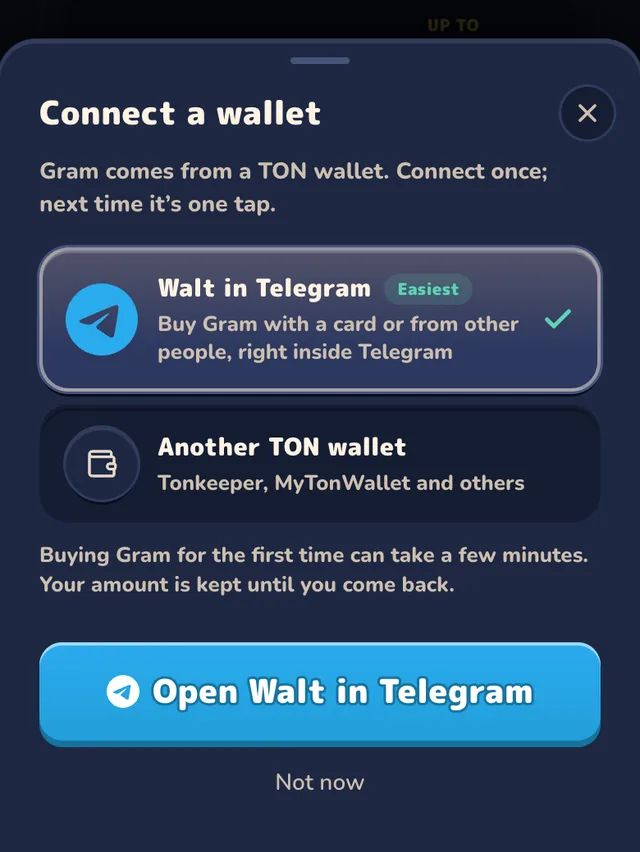
Exporting a collectible to your wallet
Once the wallet exists, the export happens from Telegram's side:
- Open the collectible gift in your profile.
- Choose the option to convert it to an NFT on the TON blockchain.
- Enter your 2FA password. Telegram requires two-factor authentication to authorise a blockchain withdrawal. If you don't have 2FA enabled, you'll need to set it up first.
- Confirm the destination address.
Two constraints regularly surprise people:
- There may be a waiting period. Some gifts carry a date before which export isn't permitted. A greyed-out option usually means the date hasn't arrived.
- It's one-way. An exported gift becomes an ordinary TON NFT and does not return to Telegram custody.
For the full lifecycle, see The Complete Guide to Telegram NFT Gifts.
Security rules that aren't negotiable
- Never type your seed phrase into anything but your own wallet app during recovery. No site, mini-app, marketplace, giveaway, or support agent legitimately needs it. This is the single most common way people lose everything.
- Connecting a wallet never requires the phrase. A real connection opens your wallet app and asks you to approve. If a form asks you to type words, it's a theft attempt.
- Read what you're signing. Approving a transaction can grant broad permissions. If you don't understand what a prompt is asking, reject it.
- Use a separate wallet for experiments. Keep valuable collectibles in a wallet that never interacts with unfamiliar apps.
- Verify addresses character by character — at minimum the first and last several. Malware that swaps a pasted address is a real category of attack.
More attack patterns in Telegram Stars Scams: Fake Generators and 8 Tricks to Spot.
FAQ
Does a TON wallet cost anything?
Creating one is free. Using it costs small network fees per transaction.
Can I move Stars into my TON wallet?
No. Stars can't be sent to a wallet, and Stars and Gram balances stay separate. The only bridge is a collectible gift: bought with Stars, upgraded, exported, then sold for Gram. See Telegram Stars vs TON.
What if I lose my recovery phrase?
With a self-custodial wallet, the contents are permanently inaccessible. There is no reset, no support ticket, no recovery. This is the trade-off you accept for full control.
Which wallet is built into Telegram?
Two. Money (formerly Gram Wallet in Telegram) is Telegram's own wallet, opened widely on October 9, 2026. Walt (formerly Wallet, @wallet) is an older bot from a separate company, with a custodial Crypto Wallet and a self-custodial DeFi Account. Both are legitimate; check which one, and which mode, you are using.
Can I have more than one?
Yes, and it's good practice: one for holding, one for interacting with new apps.
Do I need a wallet to play gift box games?
It depends on the currency. Stars boxes and Stars rounds need no wallet. Gram boxes, Gram scratch cards and Gram rounds need a connected TON wallet and a Gram deposit. A wallet also matters if you later want to take a collectible on-chain.
Win collectibles worth exporting
Gift Club's higher-tier boxes drop collectible-eligible gifts, and every prize shows its rarity band before you open. With Gram, the Orbit and Vault boxes and the scratch cards also hold NFT prizes. A Gram prize goes to your in-app Gram balance and stays there, while an NFT prize can be transferred to your connected TON wallet.
Want to go deeper?
- How to Play With Gram on Gift Club — connect this wallet and deposit, step by step.
- How to Earn Gram (TON) on Telegram — what pays Gram, and what to ignore.
- The Complete Guide to Telegram NFT Gifts — the whole custody-to-chain journey.
- How to Sell Telegram Gifts — what to do once it's in your wallet.
- Gram Wallet — Telegram's built-in wallet and the Gram Wallet app, told apart.
- Telegram Stars vs TON — two currencies, two systems.
- Where to Buy Telegram Gifts — the marketplaces your wallet unlocks.
Sources
 Spark round
Try it in Telegram
Open Gift Club, claim your Sparks and play a Spark round before you stake anything.
Play Gift ClubIn-app Stars can't be redeemed or withdrawn. 18+.
Keep reading
Gram Wallet Telegram (Money Wallet): Not Showing? How to Activate
Telegram's Gram Wallet is now the Money wallet and appears once your account receives a Gram transfer. How to activate Gram Wallet, buy Gram in Walt, send it over and stay safe.
Buy Telegram Gifts With Gram: Portals, Getgems, MRKT (2026)
Which marketplaces take Gram for Telegram gifts as of October 27, 2026, how to pay from a TON wallet, what a gift costs, and Gift Club boxes with NFT prizes.

Sell or Convert Telegram Gifts to Stars: 7-Day Rule, Fees
Convert a gift to Stars within 7 days, or upgrade and list it on Telegram's marketplace: you keep 80%, floor 125 Stars. What to do with no Sell button.
How to Buy Gram (GRAM) in Telegram: Walt, P2P, Exchanges
How to buy Gram (TON), formerly Toncoin, as of October 27, 2026: Walt by P2P or card, or an exchange with a TON withdrawal. Published fees and scams to avoid.